
Finally getting around to setting up AMS/IMS/LD. My XF admin skills are pretty rusty, so I apologise if I'm overlooking something obvious.
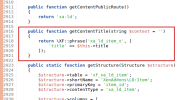
When I create a Link item and feature it, the Featured Content widget shows it as Item 'Link Title'.
The default 'Example category' that was created when installing the add-on has the setting:
Category content term: Link
The type of content being added to this category. Note: If you leave this blank, the generic term "Item" will be used.
I am understanding this to mean that the content type shown on the Featured list would show as 'Link' rather than 'Item'. I have created a new category and set that parameter, and have also created link items in both categories but they still show as 'Item' regardless.
I checked on the demo site here and all the link items show as 'Item', too.
Am I doing this wrong?
Running XF 2.3.4 and LD 2.3.11, btw.
When I create a Link item and feature it, the Featured Content widget shows it as Item 'Link Title'.
The default 'Example category' that was created when installing the add-on has the setting:
Category content term: Link
The type of content being added to this category. Note: If you leave this blank, the generic term "Item" will be used.
I am understanding this to mean that the content type shown on the Featured list would show as 'Link' rather than 'Item'. I have created a new category and set that parameter, and have also created link items in both categories but they still show as 'Item' regardless.
I checked on the demo site here and all the link items show as 'Item', too.
Am I doing this wrong?
Running XF 2.3.4 and LD 2.3.11, btw.