

This feature was funded by a Showcase Premium license holder that wishes to remain anonymous.
As per title, I've added a new carousel type (BETA) to Showcase called "Carousel overlay". This new carousel was designed by @Russ from Pixel Edit for a client to replace XF's featured content carousel and I've modified it to work within IMS (please show some love to @Russ as well).
This new carousel is an available option in all places that currently allow you to set a carousel layout type (options, category settings, widget definitions etc).
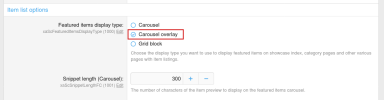
For example, in the item list options, you can see that there is a 3rd Featured items display type available titled "Carousel overlay".
Note: The viewing user must have permission to view showcase item attachments as this uses the full size image. If the viewing user does not have permission to view showcase item attachments, the standard carousel will be rendered instead.
And this is what the new Carousel type looks like. Basically takes the Cover Image and uses it as the background image for the container and then displays text overlayed on the background image (similar concept to Tile View and Grid Block layout types).


Note: If the item does not have a Cover Image or a Category Content Image, then a background color is set (similar to what I do with Grid Block, Grid View and Tile View).
Important Note: Both carousels share the same appearance Style Properties for elements to display/not display on the carousel, however, not all elements display on the carousel overlay due to design and space available!
https://xenaddons.com/javascript:
As per title, I've added a new carousel type (BETA) to Showcase called "Carousel overlay". This new carousel was designed by @Russ from Pixel Edit for a client to replace XF's featured content carousel and I've modified it to work within IMS (please show some love to @Russ as well).
This new carousel is an available option in all places that currently allow you to set a carousel layout type (options, category settings, widget definitions etc).
For example, in the item list options, you can see that there is a 3rd Featured items display type available titled "Carousel overlay".
Note: The viewing user must have permission to view showcase item attachments as this uses the full size image. If the viewing user does not have permission to view showcase item attachments, the standard carousel will be rendered instead.
And this is what the new Carousel type looks like. Basically takes the Cover Image and uses it as the background image for the container and then displays text overlayed on the background image (similar concept to Tile View and Grid Block layout types).
Note: If the item does not have a Cover Image or a Category Content Image, then a background color is set (similar to what I do with Grid Block, Grid View and Tile View).
Important Note: Both carousels share the same appearance Style Properties for elements to display/not display on the carousel, however, not all elements display on the carousel overlay due to design and space available!
https://xenaddons.com/javascript:
Upvote
0
